Icon of program: Desktopia

Desktopia for Mac

  • Free
  • 2.4
    9
  • 8K
  • V1.0
Free Download for Mac

View an ad to download for free

Alternate wallpapers automatically

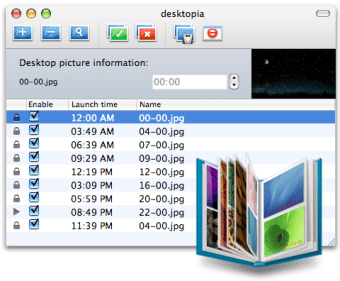
If you like to customize your desktop and regularly change your wallpaper then you should enjoy Desktopia. This free little application is simple and discreet but those the job. Coming with a suite of nice little wallpapers, it lets you easily add others and move them around in your list. You can set at what time particular wallpapers appear on your desktop. We also quite liked how easy it was to add new images just by dragging and dropping them into the list.

Top Recommended Alternative

From Desktopia's window you can preview all your wallpapers and decide to have them activated or not. Removing pictures that you're tired of is also extremely simple: just click on the red button in the menu bar. If you're thinking of setting different wallpapers for different times of the day then Desktopia is ideally suited for you.

Desktopia is a cute little application to automatically change the wallpaper on your Mac.

  • Pros

    • Simple and discreet interface
    • Change wallpaper according to time
    • Drag and drop
    • Comes with some wallpaper suite
  • Cons

    • None
 0/1

App specs

  • Developer

    • Chatelp
  • License

    Free

  • Version

    1.0

  • Latest update

  • Platform

    Mac

  • OS

    Mac OS X

  • Language

    English

  • Downloads

    8K

  • Size

    21.67 MB

Program available in other languages


Icon of program: Desktopia

Desktopia for Mac

  • Free
  • 2.4
    9
  • 8K
  • V1.0
Free Download for Mac

View an ad to download for free


User reviews about Desktopia

2.4

2 reviews

Add review

Main reviews for you

  • Anonymous user

    Totally useless. I downloaded this. I set up all my wallpapers, but then I found that anytime I put the computer into sleep mode the app closed down and wiped out all the schedules that I'd set up. So basically, I found it to be totally useless. Pros: Nothing! Cons: Seems you have to leave your computer on and running all the time for it to work properly

  • Anonymous user

    Upgrade fail!. This used to be a great piece of software, but now it's a total flop. You can't Skip This Background anymore, as you could in the previous version; now you have to open a controller, and when you do, you still can't skip to the next one.ALL the cool wallpapers of the previouis version are gone. Now all you get are a few mediocre ones.GONE are all the wallpapers that you may have rated as having liked before.On the whole, I'm annoyed I paid for this, trying to be honest, and am going to delete it shortly, I think.

More

You may also like

Explore Apps

Latest articles

Laws concerning the use of this software vary from country to country. We do not encourage or condone the use of this program if it is in violation of these laws.
Softonic

Is Desktopia safe?

100/100

Score result: Clean

This file passed a comprehensive security scan using VirusTotal technology. It is safe to download.

  • Virus free
  • Spyware free
  • Malware free
  • Verified by Security Partners

    VirusTotal logo

Scan Info

Last scan
Saturday, November 25, 2023
Scan provider
VirusTotal · Full report

File Integrity

File
desktopia.dmg
SHA256
7f38cd65519a42ef546416e983a6f5d5ea139ea574838686cafcf06d358d4252
SHA1
3ab33f97a3614bdae176b3f9e7339dc34fb6c6e8

Softonic security commitment

Desktopia has been thoroughly scanned by our advanced security systems and verified by industry-leading partners. This file comes from the official developer and has passed all our security checks, showing no signs of viruses, malware, or spyware. For more information, visit our Security and Trust Center

Signed in to Softonic as